
How to Connect Claude or ChatGPT to On-Chain Data with the CryptoQuant MCP
CQ Insights
The CryptoQuant MCP server connects Claude, ChatGPT and other AI assistants to CryptoQuant's on-chain and market data through one URL: https://mcp.cryptoquant.com/mcp. Setup is one command in Claude Code or one custom connector in Claude and ChatGPT. Once connected, the assistant gets nine tools to find metrics, query data and search CryptoQuant research.
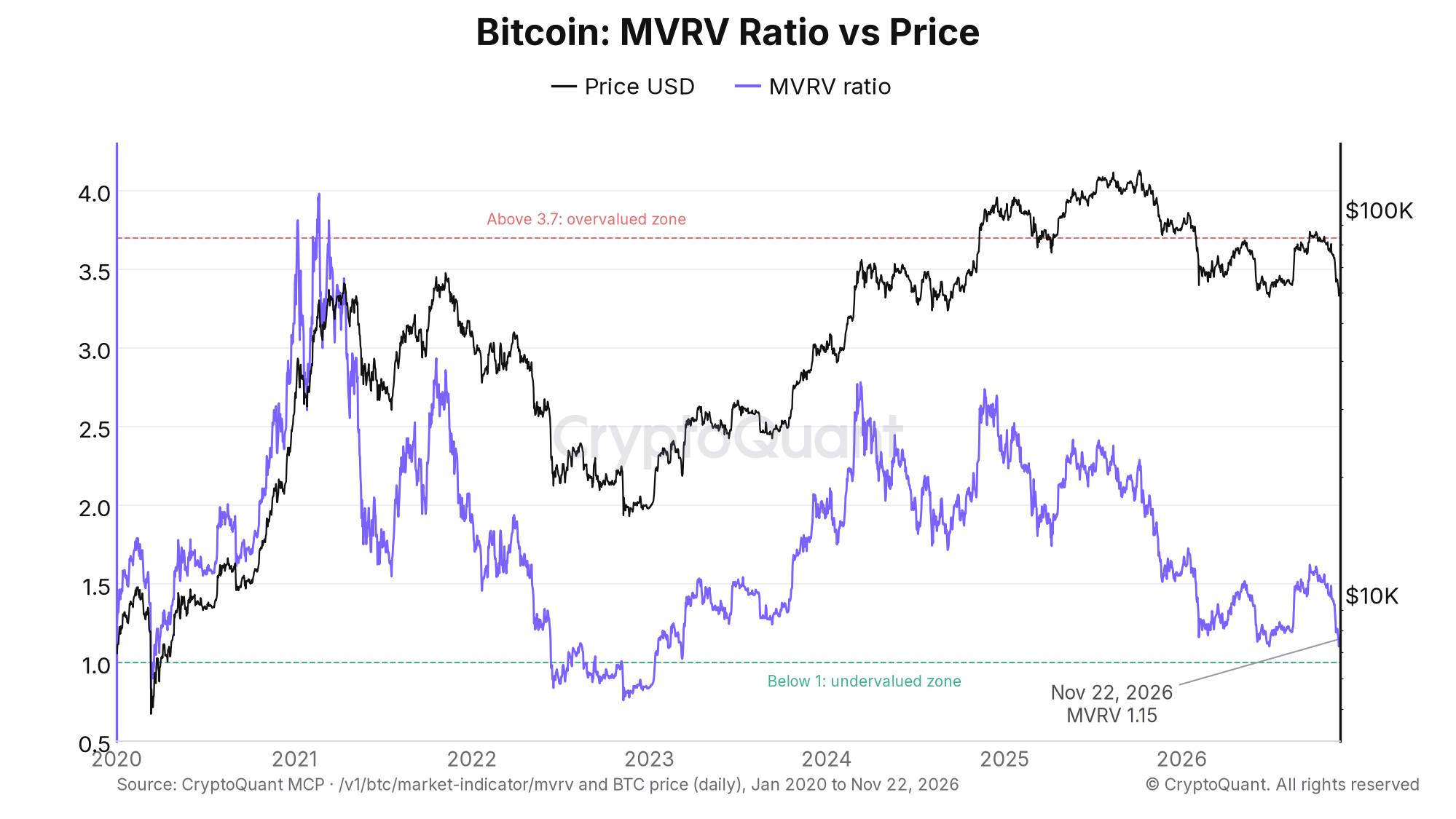
Data pulled through the CryptoQuant MCP for the prompt "Is Bitcoin overvalued right now?". Bitcoin's MVRV ratio was 1.15 on November 22, 2026.
What the CryptoQuant MCP is
MCP (Model Context Protocol) is an open standard that lets an AI assistant call outside tools. The CryptoQuant MCP is a remote MCP server over Streamable HTTP, so any client that supports remote MCP servers can connect. You ask a question in plain English. The assistant picks the endpoint, pulls the data and answers with the numbers.
The server exposed these nine tools when we connected on November 23, 2026:
Tool | What it does |
|---|---|
discover_endpoints | Finds endpoints by asset, category or keyword, and shows which ones your plan can access |
get_endpoint_info | Returns the parameters one endpoint accepts |
query_data | Fetches the data: price, market data and on-chain metrics |
list_assets | Lists supported assets and their data categories |
describe_metric | Explains a metric, with thresholds and links to the docs |
query_research | Searches CryptoQuant Research reports by topic |
recent_research | Returns the latest Research reports |
query_quicktake | Searches Quicktake posts by topic |
recent_quicktake | Returns the latest Quicktake posts |
The server is in beta, so tools and features may change. The MCP documentation adds one caution: the data is accurate, but the model you use can misread it. Ask for dates and sources in every answer.
What you need
A CryptoQuant account. MCP access follows the same plan rules as the API, and the free Basic plan is enough to start.
A client that supports remote MCP servers. This guide covers Claude, Claude Desktop, Claude Code, ChatGPT, Cursor and VS Code.
Optional: an API key. The first connection opens a CryptoQuant sign-in page with two choices. API Key gives you a dedicated rate limit. Keyless uses a shared rate limit pool. Get a key on the API page in your account settings.
Every client uses the same server URL:
https://mcp.cryptoquant.com/mcpConnect Claude (web and desktop)
Claude calls remote MCP servers custom connectors. Anthropic's help center lists them as available on Free, Pro, Max, Team and Enterprise plans, with Free limited to one custom connector.
1.
In Claude, open the connectors settings and click Add custom connector.
2.
Enter the name CryptoQuant and the remote MCP server URL https://mcp.cryptoquant.com/mcp.
3.
Click Add, then Connect.
4.
On the CryptoQuant sign-in page, choose API Key or Keyless.
5.
In a new chat, turn the CryptoQuant connector on and ask a question.
On Team and Enterprise plans, an owner adds the connector in the organization settings first. Each member then connects from their own settings.
Claude Desktop can also load the server from its config file. Open ~/Library/Application Support/Claude/claude_desktop_config.json on macOS or %APPDATA%\Claude\claude_desktop_config.json on Windows and add:
json
{
  "mcpServers": {
    "CryptoQuant": {
      "command": "npx",
      "args": ["mcp-remote", "https://mcp.cryptoquant.com/mcp"]
    }
  }
}
This route requires Node.js 18 or higher. Save the file and restart the app.
Connect Claude Code
Run one command in your terminal:
bash
claude mcp add --transport http CryptoQuant https://mcp.cryptoquant.com/mcpThen start Claude Code, run /mcp and complete the sign-in the first time the server is used. claude mcp list shows whether the server is connected.
For scripts and scheduled jobs with no browser, pass your API key as a header instead of signing in:
bash
claude mcp add --transport http CryptoQuant https://mcp.cryptoquant.com/mcp \
  --header "Authorization: Bearer YOUR_API_KEY"
We tested the header route with Claude Code 2.1.322 on November 23, 2026. The server connected and listed all nine tools.
Connect ChatGPT
The CryptoQuant MCP is a standard remote MCP server, and ChatGPT can add one as a custom MCP connection. Availability depends on your ChatGPT plan. OpenAI's help center lists custom MCP connections for Business, Enterprise and Edu workspaces, and for Pro with read and fetch permissions. They work on ChatGPT web only.
1.
On chatgpt.com, open the page where you manage apps and plugins, and choose the option to add a custom MCP server.
2.
Enter the name CryptoQuant and the server URL https://mcp.cryptoquant.com/mcp.
3.
Select OAuth for authentication, accept the notice about custom servers and create the connection.
4.
Sign in on the CryptoQuant page and choose API Key or Keyless.
5.
Review the tool list. In a chat, select CryptoQuant and ask a question.
OpenAI changes these menus often. If the labels differ, follow the OpenAI article above. The server URL and the sign-in step stay the same.
Connect Cursor or VS Code
Cursor reads .cursor/mcp.json:
json
{
  "mcpServers": {
    "CryptoQuant": {
      "url": "https://mcp.cryptoquant.com/mcp"
    }
  }
}
VS Code reads .vscode/mcp.json:
json
{
  "servers": {
    "cryptoquant": {
      "type": "http",
      "url": "https://mcp.cryptoquant.com/mcp"
    }
  }
}
Both open the CryptoQuant sign-in page on first use.
Try it: two prompts and what came back
We ran two of the example prompts from the CryptoQuant MCP page in Claude Code on November 23, 2026. The numbers below are the values the server returned.
"Is Bitcoin overvalued right now?"
Claude searched the catalog with discover_endpoints, read the metric definition with describe_metric and pulled the data with query_data. The MVRV query looks like this:
query_data(endpoint="/v1/btc/market-indicator/mvrv", params={"window": "day", "limit": 7})The response is JSON with the newest row first. These are the first three of seven rows:
json
{
  "result": {
    "window": "day",
    "data": [
      {"date": "2026-11-22", "mvrv": 1.15002831},
      {"date": "2026-11-21", "mvrv": 1.13117493},
      {"date": "2026-11-20", "mvrv": 1.10273582}
    ]
  }
}
describe_metric returned the thresholds for the MVRV ratio: below 1 is undervalued, 1 to 3.7 is neutral and above 3.7 is the overvalued zone. Claude answered that Bitcoin was not overvalued, with MVRV at 1.15 on November 22, 2026 and a realized price of $53,259. It also pulled SOPR and the latest Research report, dated November 17, 2026. For how to read the ratio at cycle highs, see How to Spot Bitcoin Cycle Tops with MVRV.
"Show me BTC exchange netflow this week."
Claude called discover_endpoints, then get_endpoint_info, then query_data on /v1/btc/exchange-flows/netflow with exchange set to all_exchange. It returned a daily table. For November 16 to 22, 2026, exchange netflow summed to −15,145 BTC, a net outflow. The largest day was November 21 at −9,787 BTC. The week before, November 9 to 15, was a net inflow of +2,534 BTC.
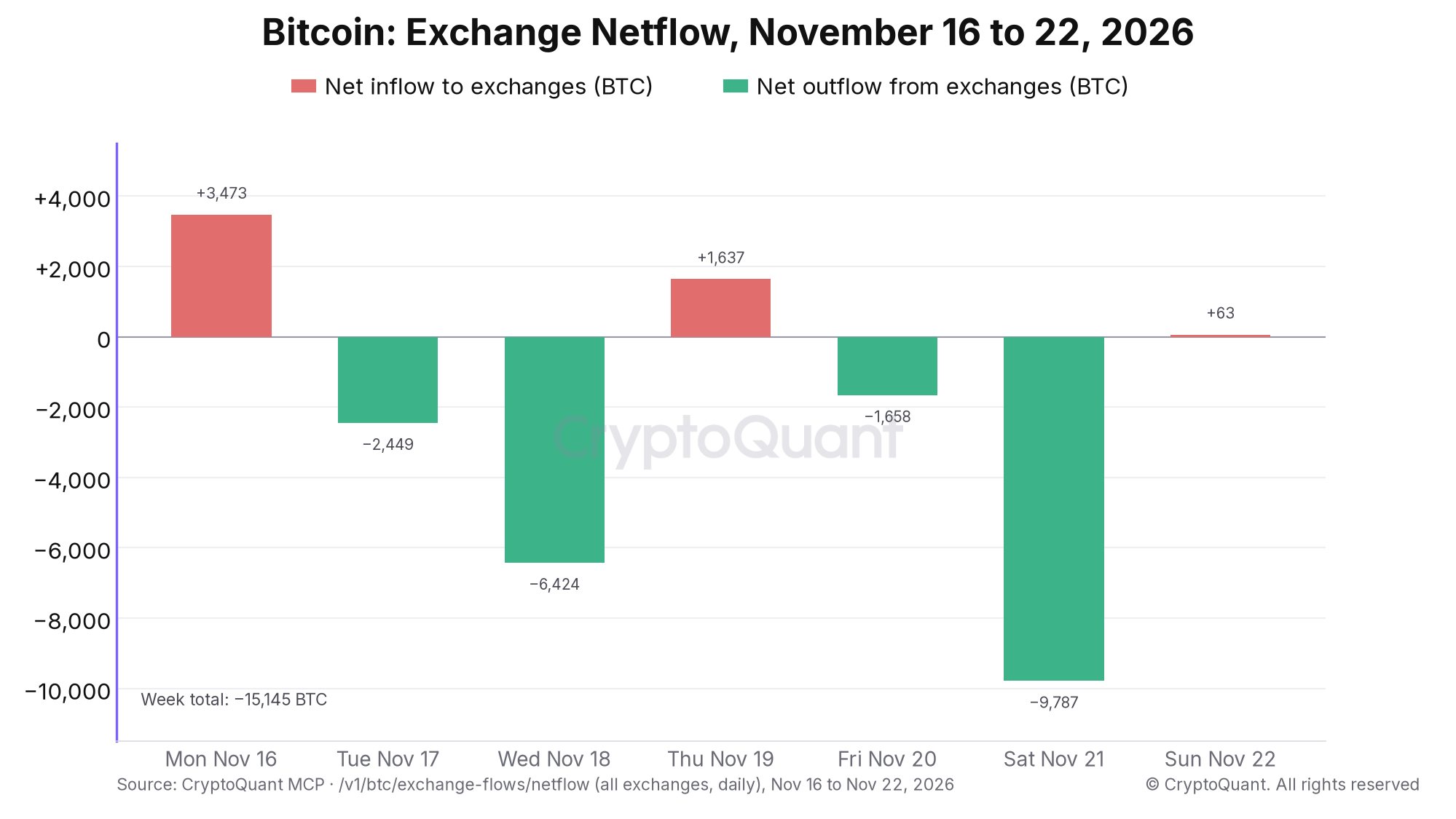
The data behind the second prompt. Bitcoin exchange netflow summed to −15,145 BTC from November 16 to 22, 2026.
Positive netflow means more BTC moved onto exchanges than off. Our exchange netflow playbook covers when an inflow matters.
More prompts to try
"What are miners doing with their BTC?"
"What's the latest research on ETH?"
Three habits make the answers reliable:
Name the asset, the metric and the period. "BTC exchange netflow, daily, last 14 days" leaves less to guess than "flows".
Ask for dates. The data is the same on every run. The wording and the choice of metrics come from the model.
Ask which endpoint it used. You can then check the same series on the live chart.
Plans, credits and limits
MCP access follows the same plan rules as the API: the same credit balance, the same resolution and the same history limits. The CryptoQuant MCP page listed these limits on November 23, 2026:
Plan | Monthly credits | Rate limit | History | On-chain data |
|---|---|---|---|---|
Basic (free) | 10,000 | 10 requests per minute | 30 days | Not included |
Advanced | 300,000 | 60 requests per minute | 1 year | Not included |
Professional | 500,000 | 120 requests per minute | 1 year | Included |
Premium | Unlimited | 800 requests per minute | Full history | Included |
One data tool call counts as one API call. Credits are deducted per successful call and scale with the rows and data type returned. Failed calls are not charged. The Research and Quicktake tools are free while the server is in beta.
Market data, such as price and the Coinbase Premium Index, is on every plan. On-chain metrics, such as exchange netflow and MVRV, need Professional or higher. The plans and limits guide has the full breakdown, and current prices are on the pricing page.
Troubleshooting
401 Unauthorized. The request reached the server without a valid sign-in. Reconnect and sign in again.
402 payment_required. Your credits ran out. Top up or wait for the monthly reset.
429 too_many_requests. You hit the rate limit. Wait and retry. Keyless connections share one pool, so an API key gives you a dedicated limit.
A metric is missing. Ask the assistant to run discover_endpoints for the asset. Each endpoint in the result has an accessible flag for your plan.
Claude Desktop does not show the server. The config file route needs Node.js 18 or higher and an app restart.
Track it live
Every series the assistant pulls has a live chart on CryptoQuant, such as the Bitcoin exchange netflow chart and the MVRV ratio chart. Set up the connection on the CryptoQuant MCP page. For scheduled jobs and backtests in code, use the CryptoQuant API.
FAQ
What is the CryptoQuant MCP?
It is a remote MCP server that gives AI assistants direct access to CryptoQuant's on-chain and market data. You connect it once by URL, then ask questions in plain English. Setup steps for each client are on the CryptoQuant MCP page.
Do I need an API key to use the CryptoQuant MCP?
No. The sign-in page offers a Keyless option that uses a shared rate limit pool. An API key from your account settings gives you a dedicated rate limit.
Does the CryptoQuant MCP work with ChatGPT?
It is a standard remote MCP server, so any client that supports remote MCP servers can connect. In ChatGPT, custom MCP connections depend on your plan. Check OpenAI's help center for the plans that include them.
Is the CryptoQuant MCP free?
MCP access is included in every CryptoQuant plan, including the free Basic plan. Each plan has its own monthly credits, rate limit and data coverage. On-chain metrics require a higher plan, listed on the pricing page.
What is the difference between the CryptoQuant MCP and the API?
The MCP is for AI assistants: you ask in plain English and the assistant pulls the data. The API is for code: scheduled jobs, backtests and pipelines. Both serve the same data under the same plan rules. Our Python tutorial shows the API route.